

Import Reviews from AliExpress
Overview
If you sell products sourced from AliExpress, you can import existing reviews into Rivyo instead of starting from zero. This is a fast way to add social proof to your product pages and build trust with shoppers.
Rivyo’s AliExpress importer works from an AliExpress product page in your browser. It collects the reviews and sends them to your Rivyo reviews dashboard, where you can review and publish them.
Imported reviews are added to your Rivyo dashboard first. You decide what to publish to your store.
Before you start
Match the product correctly: Make sure the AliExpress product page you’re importing from corresponds to the same product in your Shopify store.
Use a desktop browser: The importer is added to your browser bookmarks bar, so it works best on desktop.
Show your bookmarks bar: You’ll need it visible to click the importer.
Show your browser bookmarks bar
If you don’t see your bookmarks bar, enable it using the shortcuts below. The bookmarks bar appears below the address bar.
Chrome / Safari / Opera / Edge
Windows:
Ctrl+Shift+BMac:
Command+Shift+B
Firefox
Windows:
Ctrl+BMac:
Command+B
Import AliExpress reviews using the Rivyo importer
In your Shopify admin, open Rivyo.
Go to Reviews → Import Reviews.
Select Import from AliExpress.
Drag the Rivyo–AliExpress Importer button to your browser bookmarks bar.
You only need to add the importer bookmark once. After that, you can use it on any AliExpress product page.
Open the AliExpress product page that contains the reviews you want to import.
Confirm it’s the correct product (the reviews will be attached to the Shopify product you select in the next step).
Importing reviews to the wrong product can confuse shoppers and lower trust. Always double-check the product before starting the import.
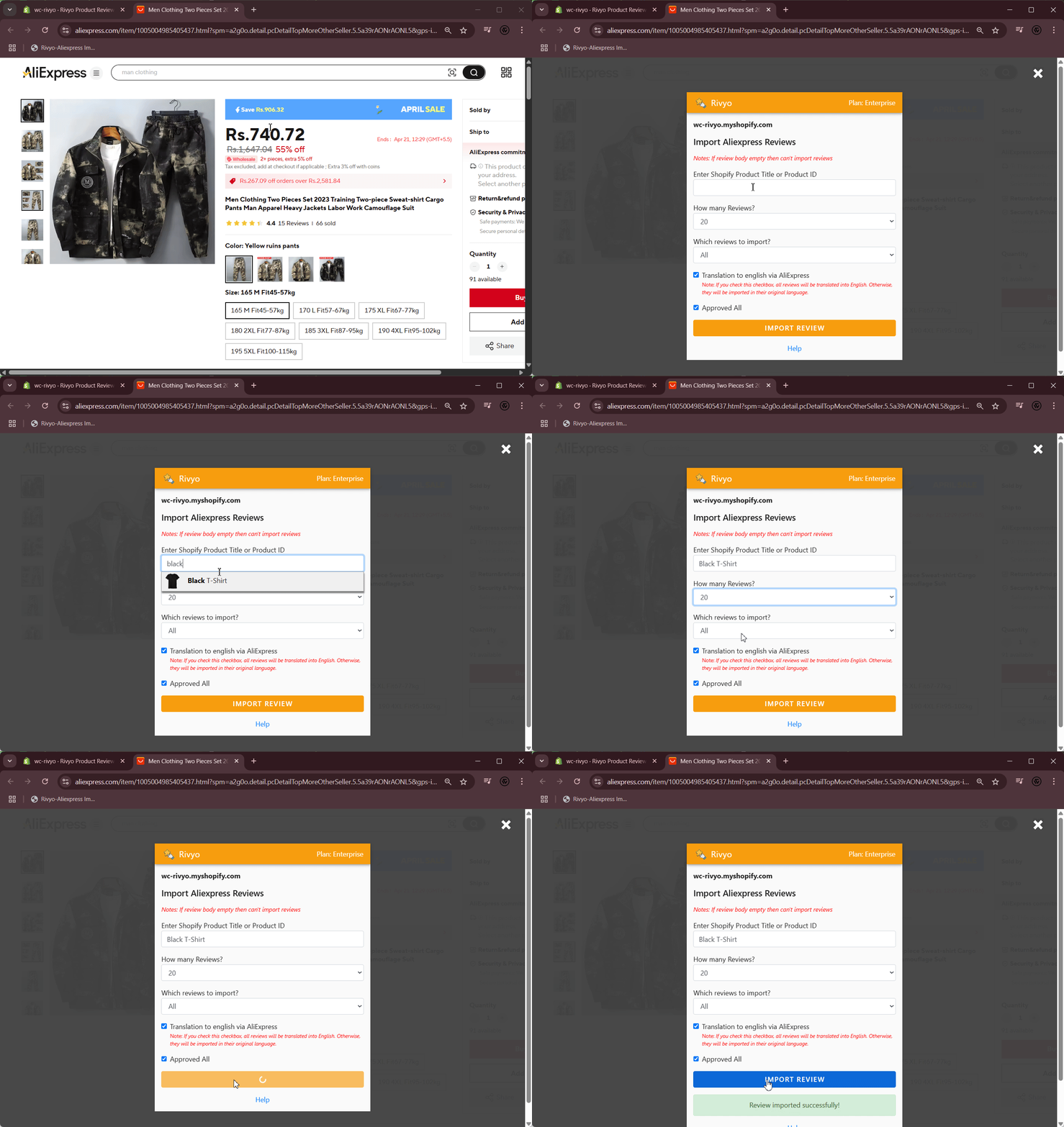
Click the Rivyo–AliExpress Importer bookmark in your browser.
When prompted, enter the Shopify product title where you want these reviews to appear.
Start the import.
Once the import finishes, the reviews are added to your Rivyo reviews dashboard.
Where imported reviews appear (and what to do next)
After importing, reviews appear in your Rivyo → Reviews dashboard. From there you can:
Approve reviews before they show on your store
Edit review text (for clarity, formatting, or store tone)
Publish approved reviews to your product pages
For the best results, review imported content before publishing. Cleaning up spelling, removing repeated comments, and approving only the most helpful reviews makes your product pages feel more credible.
Import limitations (by plan)
AliExpress imports are limited based on your Rivyo plan:
Plan | Import limit |
|---|---|
Free Plan | Up to 100 reviews from Amazon/AliExpress |
Starter Plan | Up to 500 reviews |
Business Plan | Up to 2000 reviews |
Enterprise Plan | Unlimited imports |
If you reach your plan limit, upgrade your plan to import more reviews.
Troubleshooting
Make sure your bookmarks bar is visible (see shortcuts above).
Return to Rivyo → Reviews → Import Reviews → Import from AliExpress and drag the Rivyo–AliExpress Importer button to the bookmarks bar again.
Try a different desktop browser (for example, Chrome or Edge) if the bookmarks bar is restricted by browser settings.
Confirm you are on a valid AliExpress product page that has reviews available.
Scroll on the AliExpress page and verify the reviews section loads properly.
Make sure you haven’t reached your plan import limit.
Imported reviews are assigned to the Shopify product you entered during import. If you selected the wrong product:
Find the imported reviews in your Rivyo reviews dashboard.
Correct them before publishing (for example, by editing/moving them if your workflow supports it), or remove the incorrect ones and re-import to the correct product.
Always verify the Shopify product title you enter in the importer before starting the import.
Best practices for “high-trust” imported reviews
Import relevant reviews only: Prioritize reviews that describe sizing, quality, shipping experience, or real use cases.
Avoid duplicates: If you import multiple times for the same item, review your dashboard to prevent repeated reviews from being published.
Publish selectively: A smaller set of detailed, believable reviews often converts better than a large set of low-quality comments.