

Dondy WhatsApp Integration: Send Review Requests via WhatsApp
Overview
Use the Dondy WhatsApp integration to automatically send review request messages to customers after their order is delivered. When a customer taps your review button in WhatsApp, they are taken to the product page and the Rivyo review popup opens so they can leave a review with as little friction as possible.
This setup helps you collect more reviews by reaching customers in a channel they already use and making the review flow fast and easy.
This workflow requires both Dondy: WhatsApp Marketing+Chat and Rivyo AI Reviews & Loyalty App to be installed in your Shopify store.
What this integration does
Sends WhatsApp review request messages automatically after fulfillment or delivery
Lets customers open the review flow directly from WhatsApp
Opens the product page with the Rivyo review popup ready to use
Reduces the number of steps customers need to complete a review
How it works
A customer places an order.
The order is fulfilled or delivered.
Dondy sends a WhatsApp review request based on your automation timing.
The customer taps Write a Review.
The product page opens.
The Rivyo review popup appears automatically.
The customer submits their review.
Before you start
Make sure the following are already in place before you build the automation:
Dondy: WhatsApp Marketing+Chat is installed and setup correctly.
Rivyo AI Reviews & Loyalty App is installed
Your Rivyo widget is enabled on product pages
Your store has fulfilled or delivered orders that can trigger the flow
Your WhatsApp messaging setup in Dondy is active
If the Rivyo widget is not enabled on your product page, customers may open the product page but not see the review popup.
Set up the WhatsApp review request flow
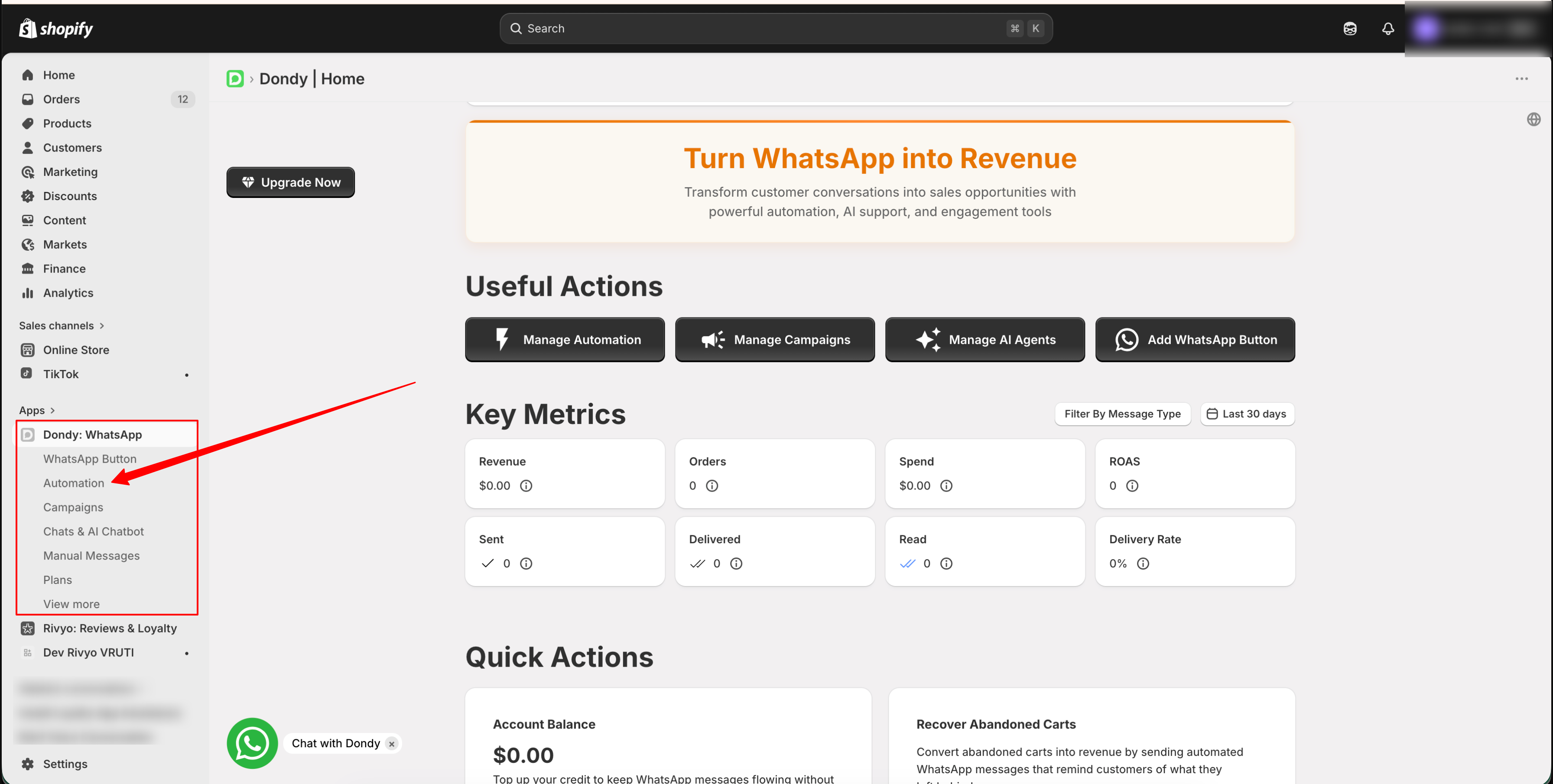
From your Shopify admin, open Dondy: WhatsApp Marketing+Chat. In Dondy, go to Automation and click Create Automation.
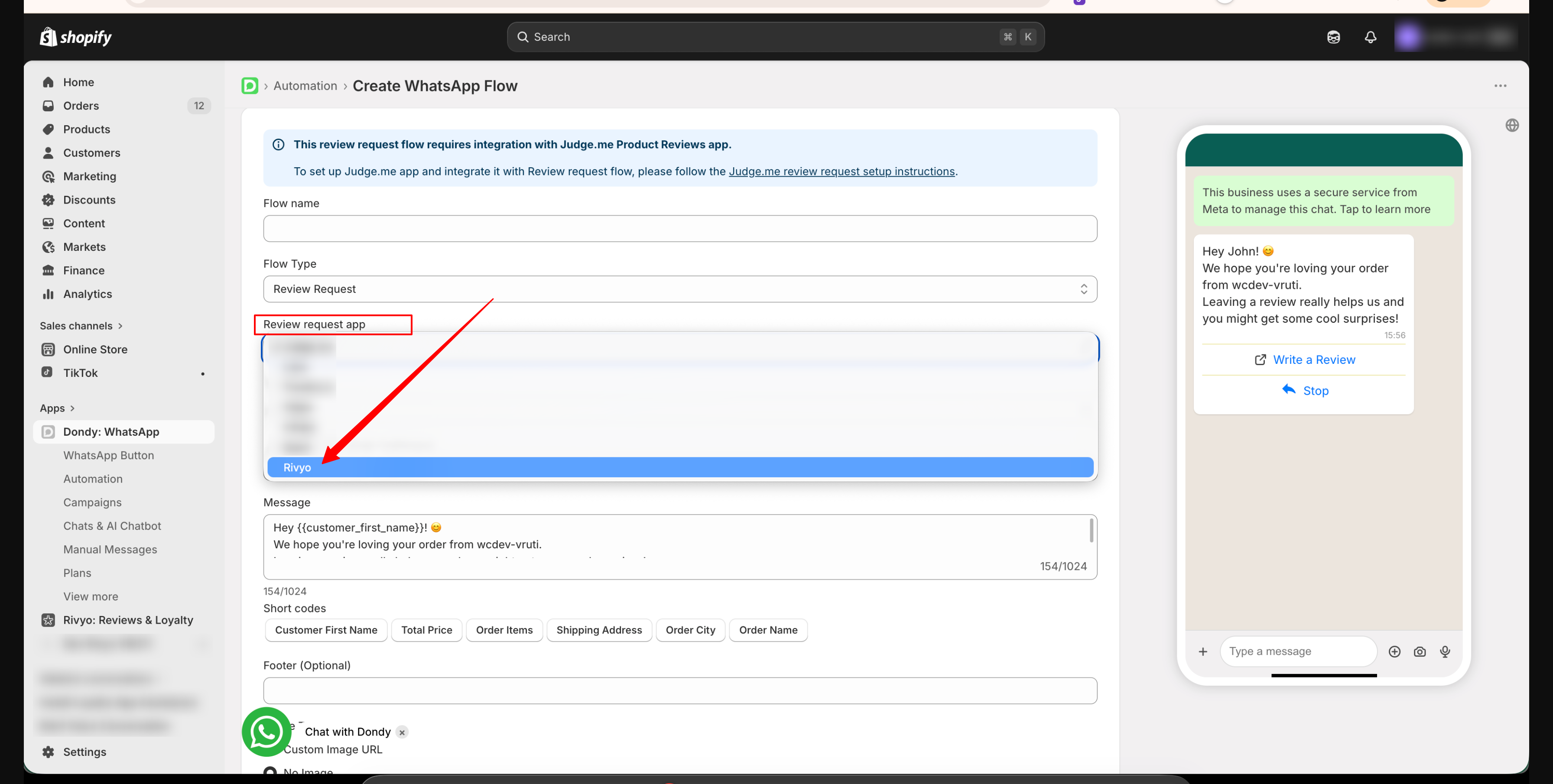
Select Review Request as the automation type. This flow is designed for post-purchase review collection.
In the Review request app section, choose Rivyo. This connects the WhatsApp message button to the Rivyo review experience.
Choose the delay for sending the WhatsApp message. A good starting point is 7 to 14 days after order fulfillment, which gives customers enough time to receive and use the product.
Keep the message short, natural, and focused on feedback. Make it clear what the customer should do next.
Hi {{Customer First Name}} 👋
We hope you're enjoying your order.
Your feedback means a lot to us 💛
Tap below to share your experience.
Set the button text to something clear, such as Write a Review. When customers tap it, they should be taken to the product page where the Rivyo review popup opens automatically.
If supported in your flow, add a simple quick reply such as Stop for opt-out handling or customer control.
Click Create Flow, then switch the automation ON. Your review request messages will now send automatically based on the timing you selected.
Recommended WhatsApp message example
Use a message that feels personal and easy to act on. Avoid making it too long.
Hi {{Customer First Name}} 👋
We hope you're loving your order.
Your feedback helps us a lot 💛
Tap below to write a quick review.
Messages with one clear action usually perform better than messages with multiple links or too much text.
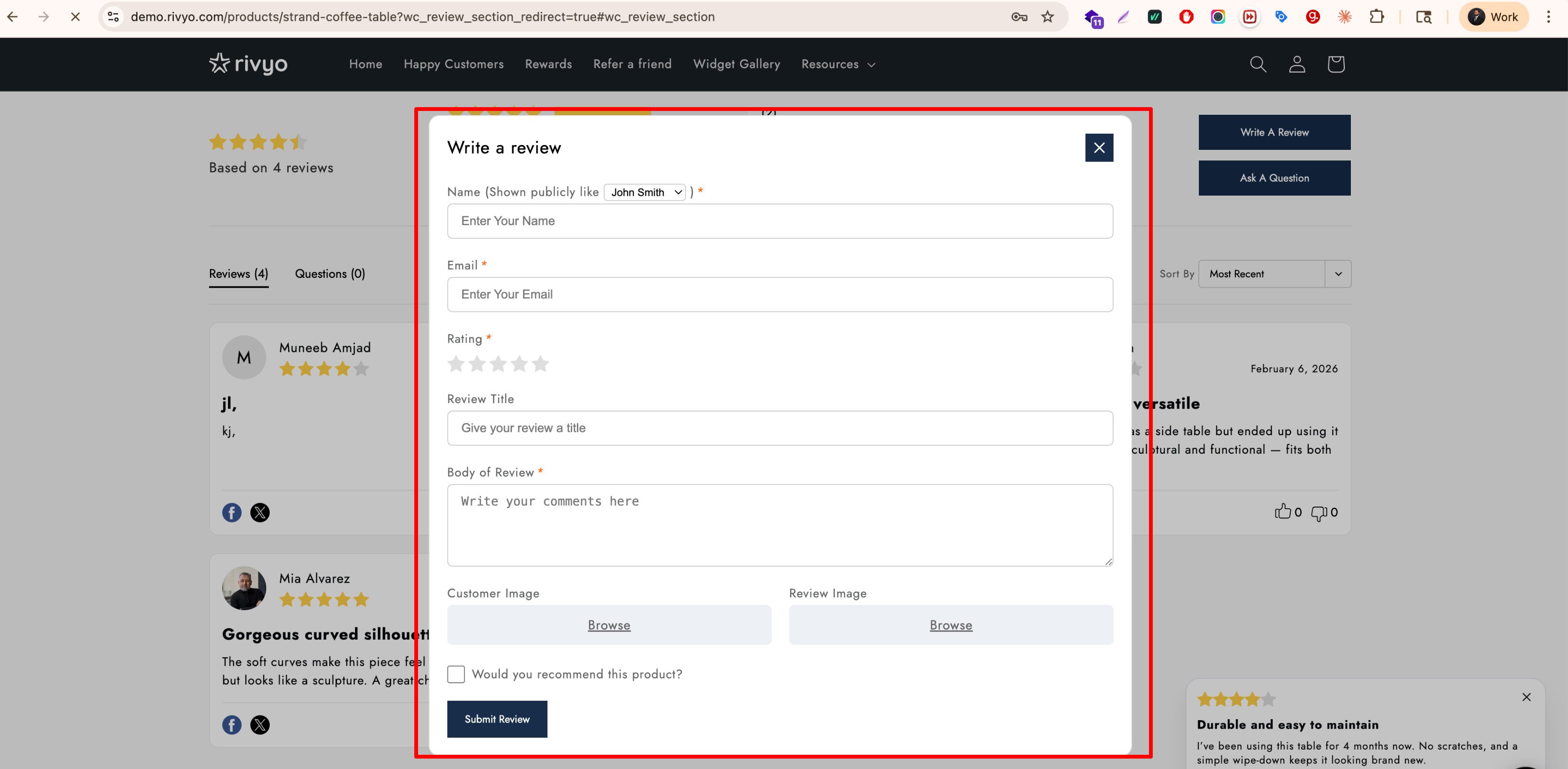
What your customers will see
They receive a WhatsApp message after their order has been fulfilled or delivered
They tap Write a Review
They are redirected to the relevant product page
The Rivyo review popup opens automatically
They submit their review in a few taps
Best practices
Send review requests 7 to 14 days after fulfillment so customers have time to use the product
Use a friendly tone that sounds human, not promotional
Keep the message focused on one action: leaving a review
Use clear button text such as Write a Review
Test the flow on your own store before turning it on for all customers
Avoid sending review requests too frequently
If it fits your brand, offer a light incentive such as loyalty points or a future discount
Before launching the automation, place a test order and complete the full journey yourself. Confirm that the WhatsApp message sends at the right time, the correct product page opens, and the Rivyo popup appears without extra clicks.
How to make this setup perform better
If you want the best results from this integration, focus on timing, clarity, and a smooth landing experience:
Match the send time to the product: products that need immediate use can often be reviewed sooner, while products that take time to evaluate should use a longer delay
Keep the destination page clean: make sure the product page loads quickly and the review widget is visible and working
Ask at the right moment: customers are more likely to respond after they have received the product and had enough time to form an opinion
Remove friction: use a direct call to action and avoid requiring customers to search for where to leave the review
Review your message copy regularly: small wording changes can improve tap-through and review rates
Troubleshooting
Check that the Rivyo widget is enabled on your product page. If the widget is missing or disabled, customers may land on the page without seeing the review popup.
Make sure the automation is turned on in Dondy and that your WhatsApp setup is active. Also confirm that your orders meet the flow conditions, such as fulfillment status and timing delay.
Open the automation in Dondy and adjust the delay settings. For most stores, sending the request 7 to 14 days after fulfillment works well, but your ideal timing may vary by product type.
Review the product page experience. Make sure the page loads properly, the Rivyo popup appears, and the review form is easy to complete on mobile devices.
Quick checklist
Dondy is installed
Rivyo is installed
Rivyo widget is enabled on product pages
Review Request automation is created in Dondy
Rivyo is selected as the review app
Timing is set appropriately
Button text is clear
The flow is turned on
You have tested the full customer journey
Summary
The Dondy WhatsApp integration gives you a simple way to ask for reviews after an order is delivered. By connecting Dondy with Rivyo, you can send customers straight from WhatsApp to a product page where the review popup opens automatically. Keep the message short, send it at the right time, and test the full flow to get the best results.